
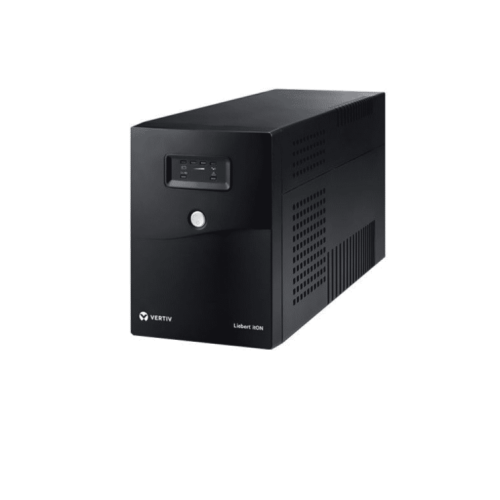
Vertiv Liebert UPS
Vertiv Liebert itON 2000VA Line-Interactive UPS – IEC | LI32151CT21
KSh 28,000.00 Ex. VAT
A UPS (Uninterruptible Power Supply) provides temporary battery power when the main electricity supply fails. Depending on its design, it can also help regulate voltage and protect connected equipment from certain power disturbances.UPS systems are useful for home offices, businesses, schools, server rooms, data centres, retail environments and network installations. They help keep essential equipment running during short interruptions and provide time to save work or shut down systems safely.Reliable UPS and Power Backup Solutions
Types of UPS Systems
- Standby (Offline) UPS
- Line-Interactive UPS
- Online (Double-Conversion) UPS
How to Choose the Right UPS
- Calculate your equipment's power requirements
- Consider the required backup runtime
- Choose the correct UPS format
- Tower UPS: Suitable for many desktop computers, workstations and office environments.
- Rackmount UPS: Designed for compatible server racks and network cabinets.
- Online UPS: A common choice for sensitive IT equipment and critical infrastructure.
- Mini DC UPS: Designed for compatible low-voltage devices such as routers and fibre ONT/ONU units. Confirm the required DC voltage, current, connector and polarity before purchasing.
- Check battery compatibility
Explore APC UPS systems for power backup options across home, office and IT environments. Check the model's VA and watt capacity, outlets, voltage regulation features and runtime.Explore UPS Brands and Power Backup Products
APC UPS
Eaton UPSBrowse Eaton UPS systems for line-interactive and online UPS options, including models for office equipment, server racks and larger installations.
EcoFlow and AccessoriesExplore EcoFlow products and accessories for portable power backup options. Check the available output, battery capacity, supported charging methods and device compatibility for each model.
EVI UPSShop EVI UPS systems for different power capacities and configurations, including line-interactive and online UPS models.
Giganet UPSBrowse Giganet UPS products and compare available models according to their capacity, output rating and intended application.
Lightwave UPSExplore Lightwave UPS systems for power backup options. Check the product specifications to find a suitable model for your equipment.
Mecer UPSShop Mecer UPS systems for different applications, from desktop computer backup to online and rackmount power protection.
Mercury UPSBrowse Mercury UPS systems and compare available capacity, watt output, battery backup and connectivity features.
Secureye UPSExplore Secureye UPS systems for backup power options for compatible computers and electronic equipment.
UPS BatteriesShop UPS batteries for replacement battery options. Always confirm the voltage, amp-hour rating, battery dimensions and terminal type required by your UPS.
Vertiv Liebert UPSExplore Vertiv Liebert UPS systems for power protection options used in IT infrastructure and other critical applications. Compare the model's capacity, topology, runtime and installation requirements.
Common FAQsWhat is a UPS and how does it work?A UPS is a device that provides temporary battery power when the main electricity supply fails. Depending on the type, it can also regulate voltage and help protect connected equipment from power disturbances.
Which UPS is suitable for a desktop computer?A suitable UPS depends on the computer's power consumption, monitor and other connected devices. Check the total watt load and choose a UPS with sufficient VA and watt capacity, with some additional headroom.
What is the difference between offline, line-interactive and online UPS systems?Offline UPS systems switch to battery when required. Line-interactive models also provide automatic voltage regulation. Online double-conversion UPS systems continuously convert power to provide a more consistent output and virtually zero transfer time.
What size UPS do I need for my office?Add the power requirements of the equipment you want to protect, then select a UPS that supports the combined watt load and required VA rating. Consider future expansion and the amount of backup time needed.
How long can a UPS provide backup power?Runtime varies according to battery capacity, battery condition, UPS efficiency and connected load. A lightly loaded UPS generally runs longer than the same unit carrying a heavy load. Refer to the manufacturer's runtime chart for the specific model.
Can a UPS protect a Wi-Fi router or fibre internet connection?Yes. A compatible mini DC UPS can provide backup power for a router and fibre ONT/ONU device. Confirm that its output voltage, current capacity, connector and polarity match the equipment.
What is the difference between a line-interactive UPS and an online UPS?A line-interactive UPS uses AVR to correct certain voltage fluctuations and switches to battery when needed. An online UPS uses double conversion to provide continuous conditioned output with virtually zero transfer time.
When should I replace my UPS battery?Replace a battery when it no longer holds sufficient charge, backup runtime becomes inadequate, the UPS reports a battery fault or the manufacturer recommends replacement. Battery life depends on operating conditions and maintenance.
Can I use any 12V battery in my UPS?No. The battery must match the UPS manufacturer's specified voltage, capacity range, battery type, dimensions and terminal connection. Check the model documentation before replacing it.
What is the difference between a UPS and an EcoFlow portable power station?A conventional UPS is designed to provide backup power and, depending on its topology, power conditioning for connected equipment. An EcoFlow portable power station is a battery-based portable power source with its own output and charging features. The right option depends on the equipment, required runtime and intended use.
Find the Right UPS for Your Power RequirementsChoose a UPS or power backup system based on the equipment you need to protect, total power consumption, required runtime and installation environment. Compare available brands and specifications at Zemaro Tech Store to identify a suitable option for your home, office or business.